The hook module
Hooks in duat are functions that are called automatically whenever some specific event happens. They are very similar to kakoune’s hooks or neovim’s autocmds. However, one thing that distinguishes the versatility of duat’s hooks is the fact that they present you with arguments whose type is inferred at compile time:
setup_duat!(setup);
use duat::prelude::*;
use widgets::*;

fn setup(opts: &mut Opts) {
    // Note the Pass, so you have mutable global state access.
    // The type of the second argument is inferred.
    hook::add::<ModeSwitched>(|pa, switch| {
        if switch.old.name == "Insert" && switch.new.name == "Normal" {
            _ = context::current_buffer(pa).save(pa);
        }
    });

    // Handle is an alias for Handle<Buffer> and is frequently
    // seen in various hooks.
    hook::add::<BufferOpened>(|pa, buffer: &Handle<Buffer>| {
        let buf = buffer.write(pa);
        match buf.filetype() {
            Some("rust" | "cpp") => {
                buf.opts.wrap_lines = true;
                buf.opts.wrapping_cap = Some(100);
            }
            Some("markdown" | "asciidoc") => {
                buf.opts.tabstop = 2;
                buf.opts.extra_word_chars = &['-'];
            }
            Some("lua" | "javascript") => buf.opts.tabstop = 2,
            _ => {}
        };
    });

    // You can call hooks for many things...
    hook::add::<WidgetOpened<LineNumbers>>(|pa, handle| {
        // This will put a vertical ruler on the left of the `LineNumbers`
        // making for a "stylish" column of numbers.
        VertRule::builder().push_on(pa, handle);
    });

    // In this hook, I'm incrementing a key_count every time a key is
    // typed...
    let key_count = RwData::new(0);
    hook::add::<KeyTyped>({
        let key_count = key_count.clone();
        move |pa, _| {
            *key_count.write(pa) += 1;
        }
    });

    // ...then I'm adding said key_count to the status line.
    opts.fmt_status(move |_| {
        let mode_txt = mode_txt();
        let key_count = key_count.clone();
        status!("{name_txt} {mode_txt}{Spacer}{sels_txt} {main_txt} {key_count}")
    })
}
Creating new hooks
Another interesting thing about hooks in duat is that you can create your own.
You do that by implementing the Hookable trait on a type:
use duat::prelude::*;

struct OnIdle(Handle<Buffer>);

impl Hookable for OnIdle {
    // The Input type is the value available when calling `hook::add`
    type Input<'h> = &'h Handle<Buffer>;

    fn get_input<'h>(&'h mut self, _: &mut Pass) -> Self::Input<'h> {
        &self.0
    }
}
Then, you decide when to trigger said hook:
struct OnIdle(Handle<Buffer>);

impl Hookable for OnIdle {
    type Input<'h> = &'h Handle<Buffer>;

    fn get_input<'h>(&'h mut self, _: &mut Pass) -> Self::Input<'h> {
        &self.0
    }
}
use duat::prelude::*;
use std::{
    sync::atomic::{AtomicBool, AtomicUsize, Ordering},
    time::Duration,
};

static COUNTER: AtomicUsize = AtomicUsize::new(0);
static QUITTING: AtomicBool = AtomicBool::new(false);

fn setup_hook() {
    // Start counting as soon as the user stops typing.
    hook::add::<KeyTyped>(|pa, _| COUNTER.store(0, Ordering::Relaxed));
    hook::add::<ConfigUnloaded>(|_, _| QUITTING.store(true, Ordering::Relaxed));

    std::thread::spawn(|| {
        while !QUITTING.load(Ordering::Relaxed) {
            std::thread::sleep(Duration::from_secs(1));
            let elapsed = COUNTER.fetch_add(1, Ordering::Relaxed);

            // Every 60 seconds, trigger an `OnIdle` event
            if elapsed + 1 == 60 {
                // We have to queue it, since this is being
                // called from another thread.
                context::queue(|pa| {
                    let buffer = context::current_buffer(pa);
                    hook::trigger(pa, OnIdle(buffer));
                });
            }
        }
    });
}
Then, the user can just add their own hooks, which will be called accordingly:
struct OnIdle(Handle<Buffer>);

impl Hookable for OnIdle {
    type Input<'h> = &'h Handle<Buffer>;

    fn get_input<'h>(&'h mut self, _: &mut Pass) -> Self::Input<'h> {
        &self.0
    }
}
fn setup_hook() {}
setup_duat!(setup);
use duat::prelude::*;

fn setup(opts: &mut Opts) {
    // This would be called from a `Plugin::plug` function
    setup_hook();

    hook::add::<OnIdle>(|pa, _| {
        let mut saved = 0;

        for buffer in context::buffers(pa) {
            if buffer.read(pa).has_unsaved_changes() && buffer.save(pa).is_ok() {
                saved += 1;
            }
        }

        if saved > 0 {
            context::info!("Saved [a]{saved}[] buffers from idling");
        }
    });
}
List of hooks
Here’s the list of currently available hooks, more will be added in the future.
For the list of arguments of each hook, remember that there will always be
&mut Pass argument, and that the other arguments will come in a tuple.
For example, if a hook has two arguments, i32 and bool, they will actually
come in as (i32, bool) in the second argument of the hook. So you should pass
a function like this:
struct FooHook;
impl Hookable for FooHook {
    type Input<'h> = (i32, bool);

    fn get_input<'h>(&'h mut self, _: &mut Pass) -> Self::Input<'h> {
        (0, true)
    }
}
setup_duat!(setup);
use duat::prelude::*;

fn setup(opts: &mut Opts) {
    hook::add::<FooHook>(|pa, (arg1, arg2): (i32, bool)| {
        // ...
    });
}
Also, when a hook says that it has no arguments, what this actually means is
that the second argument is of type (), so the function argument still needs
to have two arguments in it.
BufferOpened
Triggers after opening a Buffer. You will want to use this hook to set
buffer-wise configuration options:
setup_duat!(setup);
use duat::prelude::*;

fn setup(opts: &mut Opts) {
    // Options set initially for all `Buffer`s
    opts.tabstop = 4;

    // Changing those options on a buffer by buffer basis.
    hook::add::<BufferOpened>(|pa, buffer| {
        let buf = buffer.write(pa);

        match buf.filetype() {
            Some("haskell" | "commonlisp") => buf.opts.tabstop = 2,
            Some("txt" | "markdown" | "asciidoc") => {
                buf.opts.tabstop = 2;
                buf.opts.wrap_lines = true;
                buf.opts.wrapping_cap = Some(80);
            }
            _ => {}
        }
    });
}
Note that this hook is just a an alias for WidgetOpened<Buffer>.
Arguments
- The
Handle<Buffer>of theBufferthat was opened.
BufferClosed
Triggers as a Buffer is being closed. This can happen for two reasons:
- The
Bufferhas been closed, through something like:qor:wq. - The
Bufferis being unloaded to be reloaded after reloading the config, because you called:reloador typed<c-r>in normal mode.
Arguments
- The
Handle<Buffer>that was unloaded. trueif theBufferis going to reload,falseif it is just being closed.
BufferUpdated
Triggers whenever the Buffer is modified in any way.
In order to trigger many things automatically, this is the most frequently used
hook in Duat. It is useful in many areas, most notably to keep track of every
change that takes place in Buffers:
use duat::prelude::*;
struct MyPlugin;

impl duat::Plugin for MyPlugin {
    fn plug(self, opts: &mut Opts, _: &duat::Plugins) {
        // A namespace used to track changes to every `Buffer`.
        let tracker_ns = Ns::new();

        hook::add::<BufferOpened>(move |pa, buffer| {
            // Flush initial empty moment.
            _ = buffer.read(pa).moment_for(tracker_ns)
        });

        hook::add::<BufferUpdated>(move |pa, buffer| {
            let moment = buffer.read(pa).moment_for(tracker_ns);

            for change in moment.iter() {
                // Update Plugin state based on changes.
            }
        });
    }
}
This particular pattern can be found all over the place. Two major examples being
duat-lsp and duat-treesitter.
Do note here that the Buffer::moment_for function may be called from anywhere
it’ll just retrieve all the Changes that took place since the last call with the
same Ns.
Arguments
- The
Handle<Buffer>that was updated.
BufferSwitched
Triggers whenever you switch the active Buffer.
Arguments
- The previous
Handle<Buffer>. - The current
Handle<Buffer>.
BufferSaved
Triggers right after saving a Buffer. This will happen whenever you call any
of the write family of commands, or if Handle::<Buffer>::save is called.
Arguments
- The
Handle<Buffer>that was saved. - A
bool, which istrueif theBufferis being closed, through commands likewq.
ConfigLoaded
Will trigger right after initially loading the config crate on
~/.config/duat/ or wherever you’re loading the config from.
Arguments
- There are no arguments, just the normal
&mut Pass
ConfigUnloaded
Will trigger right before unloading the config crate on
~/.config/duat/ or wherever you’re loading the config from.
This will also trigger upon exiting Duat.
Arguments
- Wether we are also about to quit Duat (i.e. after
:q,:wq, etc).
FocusedOnDuat
Triggers when Duat gains focus from the operating system.
Arguments
- There are no arguments, just the normal
&mut Pass
UnfocusedFromDuat
Triggers when Duat loses focus from the operating system.
Arguments
- There are no arguments, just the normal
&mut Pass
WidgetOpened<W>
Triggers when a widget W is opened. Its most common form is
WidgetOpened<Buffer>, which is aliased to BufferOpened.
This hook is very useful for building the layout of Duat. In fact, it’s what places all the widgets on screen, including line numbers, gutters, etc.
It’s also used in other scenarios, like delayed setup of widgets, which is sometimes necessary when spawning them.
Arguments
- The
Handle<W>that was just opened.
WindowOpened
Triggers when a new window is opened. This includes the first one.
Much like WidgetOpened, this hook is very useful for building the
layout of Duat. By default, it’s what adds the footer widgets and the
logs.
Arguments
- The
Windowthat was just opened.
ModeSwitched
Triggers when switching Modes, like going from Normal mode to Prompt mode.
Note that this is triggered every time a mode switch happens, even if it’s from
one mode to the same mode.
This is another hook that is very frequently used. Modes delineate clear changes id duat’s behavior, so adding hooks for them makes a lot of sense:
setup_duat!(setup);
use duat::prelude::*;

fn setup(opts: &mut Opts) {
    form::enable_mask("hidden", true);
    form::set("cursor.main.hidden", Form::default());
    form::set("cursor.extra.hidden", Form::default());
    form::set("selection.main.hidden", Form::default());
    form::set("selection.extra.hidden", Form::default());

    let mask_ns = Ns::new();

    hook::add::<ModeSwitched>(move |pa, mut switch| {
        let buffer = context::current_buffer(pa);
        if let Some(prompt) = switch.new.get_as::<Prompt>()
            && prompt.is::<mode::RunCommands>()
        {
            buffer.text_mut(pa).insert_tag(mask_ns, .., Mask("hidden"));
        } else {
            buffer.text_mut(pa).remove_tags(mask_ns, ..);
        }
    });
}
This is a relatively simple hook, all it does is hide the cursors and
selections of the current Buffer while you’re running commands.
Arguments
- A
ModeSwitch, which contains information about theoldandnewmodes, namely theModeitself, which you can query withold.is::<Normal>()or get directly viaold.get_as::<Normal>(). It also contains theHandle<dyn Widget>s active in theoldandnewmodes.
KeySent
Whenever a KeyEvent is sent to Duat. This will include only the keys that
“make it” to Duat. This means that, mapped keys are sent, but the keys that
mapped to them are not. (i.e. map::<Insert>("jk", "<Esc>") will make it
so jk isn’t sent.
For now, this only includes press and repeat keys.
Arguments
- The
KeyEventthat was sent.
KeyTyped
Contrary to KeySent, KeyTyped will trigger on keys that are actually
typed. That is, even with map::<Insert>("jk", "<Esc>"), jk will be
typed and <Esc> will not.
Arguments
- The
KeyEventthat was typed.
OnMouseEvent
Triggers whenever a MouseEvent takes place. You can do some fun things
with this one, like creating spawned widgets that follow the mouse around:
setup_duat!(setup);
use duat::prelude::*;
use text::TagPart::{PopForm, PushForm};

fn setup(opts: &mut Opts) {
    let mut showing_forms = false;
    let showing_forms_ns = Ns::new();

    cmd::add("show-forms", move |pa: &mut Pass| {
        if showing_forms {
            let handles = Vec::from_iter(context::current_window(pa).handles(pa).cloned());
            for handle in handles {
                handle.text_mut(pa).remove_tags(showing_forms_ns, ..);
            }
            hook::remove(showing_forms_ns);
            showing_forms = false;
            return Ok(None);
        }

        showing_forms = true;
        hook::add::<OnMouseEvent>(move |pa, event| {
            let handles = Vec::from_iter(context::current_window(pa).handles(pa).cloned());
            for handle in handles {
                handle.text_mut(pa).remove_tags(showing_forms_ns, ..);
            }

            if let Some(points) = event.points
                && let Some(tp) = points.as_within()
            {
                let forms = Vec::from_iter(
                    event
                        .handle
                        .text(pa)
                        .tag_parts_rev(tp.real.byte())
                        .filter_map(|(byte, tag)| {
                            if let PushForm(id, _) | PopForm(id) = tag {
                                Some((byte, id, matches!(tag, PushForm(..))))
                            } else {
                                None
                            }
                        })
                        .take(10),
                );

                let mut builder = Text::builder();

                for (byte, id, is_pushing) in forms.into_iter().rev() {
                    if is_pushing {
                        builder.push(txt!("Pushed {id}{} on {byte}\n", id.name()));
                    } else {
                        builder.push(txt!("Popped {id}{} on {byte}\n", id.name()));
                    }
                }

                event.handle.spawn_on_text(
                    pa,
                    widgets::Sections::new(Ns::basic(), builder.build(), None, 0),
                    tp.real,
                    showing_forms_ns,
                    ui::DynSpawnSpecs::default()
                );
            }
        })
        .grouped(showing_forms_ns);

        Ok(None)
    });
}
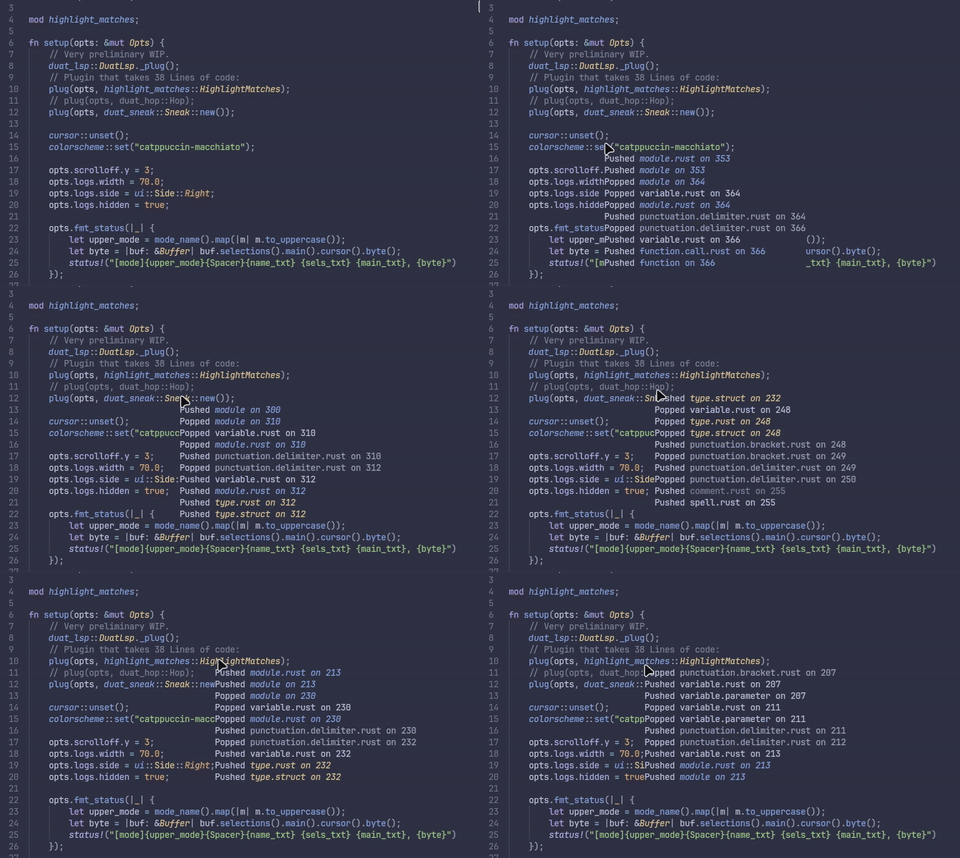
The snippet above will show a Widget that displays some of the previous
Form pushes and Form pops from the mouse position.
Arguments
- The
MouseEvent, which details the kind, modifier,Coord,TwoPointsPlaceandHandleof the event.
FormSet
Triggers whenever a Form is added or altered.
Arguments
- The
Form’s name as a&'static str. - The
FormId. - The actual
Formvalue.
ColorschemeSet
Triggers whenever the colorscheme changes.
Arguments
- The colorscheme name as a
&'static str. - A
&[(String, Form)]association between each form name and its value.
MsgLogged
Triggers whenever a message is logged, be it via debug!, warn!, error!
or info!.
Arguments
- A
Recordrepresenting the message that was logged.